






What Is a JSON Formatter?
A JSON formatter is a developer tool that makes JSON data easier to read by applying consistent indentation and structure. ToolSwift JSON Formatter lets you format and beautify JSON directly in your browser without installing separate software.
How to Format JSON Online
- Paste your JSON data into the editor above.
- Choose the indentation size you want to use.
- Click Format to beautify the JSON.
- Use Copy All to copy the formatted result or Download File to save it.
JSON Formatter Example
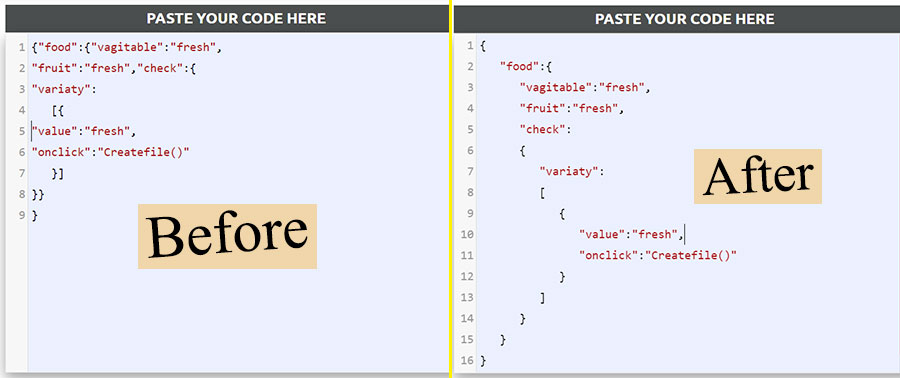
Benefits of Using a JSON Formatter
- Beautify JSON code in one click.
- Improve readability with consistent indentation.
- Copy the complete formatted JSON quickly.
- Download formatted JSON as a file.
- Choose the indentation size for your preferred code style.
- Clear the editor quickly and format another JSON document.
- Use the tool directly in a modern web browser.
What Is JSON?
JSON stands for JavaScript Object Notation. It is a lightweight text format commonly used to store and exchange structured data between applications, websites, APIs, and services. JSON is easy for people to read and is supported by many programming languages.
JSON files commonly use the .json extension and contain objects, arrays, strings, numbers, booleans, and null values.
JSON Formatter vs. JSON Validator
A JSON formatter focuses on making JSON easier to read by applying indentation and structure. A JSON validator checks whether JSON follows the required syntax. If you need to check JSON syntax, use the JSON Validator.
Frequently Asked Questions
Is this JSON Formatter free?
Yes. ToolSwift JSON Formatter is available to use online for free.
Can I download the formatted JSON?
Yes. After formatting your JSON, use the Download File option to save the result.
Can I choose the indentation size?
Yes. You can enter the indentation size before formatting your JSON.
Does the formatter require software installation?
No. The formatter works in a modern web browser, so no separate software installation is required.
Where can I format XML?
Use the XML Formatter to format and beautify XML online.